Drift Detection
Detect when your store prices change outside of BasePrice. Catch unauthorized or accidental price modifications with country-level monitoring and alerts.
Drift detection is available on the Growth and Scale tiers.
What Is Drift?
Price drift occurs when the live prices in App Store Connect or Google Play Console don't match what BasePrice last published. This can happen when:
- Someone manually changes prices in the store console
- A store applies automatic pricing changes (e.g., tax adjustments)
- A third-party tool modifies prices
- Store API issues cause partial updates
How It Works
BasePrice compares two price snapshots for each product:
| Snapshot | Description |
|---|---|
| Expected | The prices from your last publish |
| Actual | Current prices fetched from the store APIs |
If any country's price differs beyond a small tolerance (to avoid false positives from rounding), it's flagged as a drift anomaly.
Drift Detection Flow
Sync Live Prices
BasePrice fetches current prices from Apple and Google APIs. This can happen automatically (background tasks) or manually (click "Sync" on the product page).
Compare Snapshots
For each country and store product, BasePrice compares the expected price (from your last publish) against the actual live price.
Flag Anomalies
Any price that differs beyond the tolerance threshold is flagged as a drift anomaly with full details.
What You See
When drift is detected:
- A red badge appears on the affected product
- The drift details show a side-by-side comparison:
- Expected price (what BasePrice published)
- Actual price (what's currently in the store)
- Currency and country information
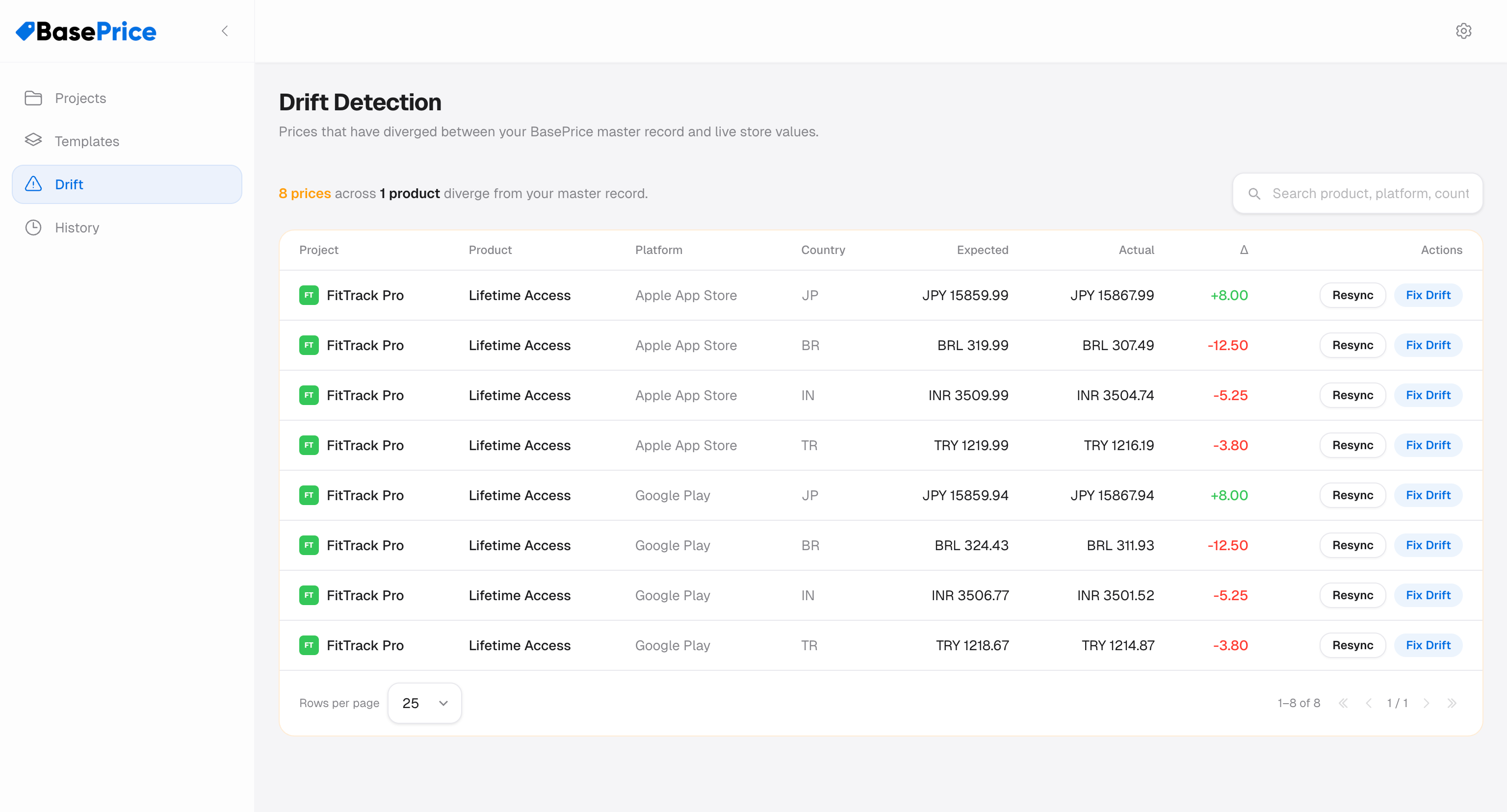
Drift Anomaly Details
Each anomaly contains:
| Field | Description |
|---|---|
| Product | Affected product name and ID |
| Platform | Which store (Apple or Google) |
| Country | Which country's price drifted |
| Expected Price | What BasePrice published |
| Actual Price | What the store currently has |
| Currency | Local currency code |
Responding to Drift
When drift is detected, you can:
- Re-publish — Push your BasePrice prices again to overwrite the drift
- Accept — Update your BasePrice configuration to match the new live price
- Investigate — Check who or what changed the price